Monday, November 25, 2019

Reaction Diffusion & Fluid Grid

The intention of my 800 project is to test an old-school Vortex-Knot-Atoms theory of everything, 


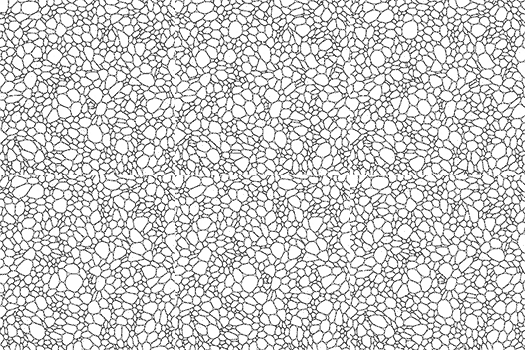
... and my approach is that of a dynamic-foam,


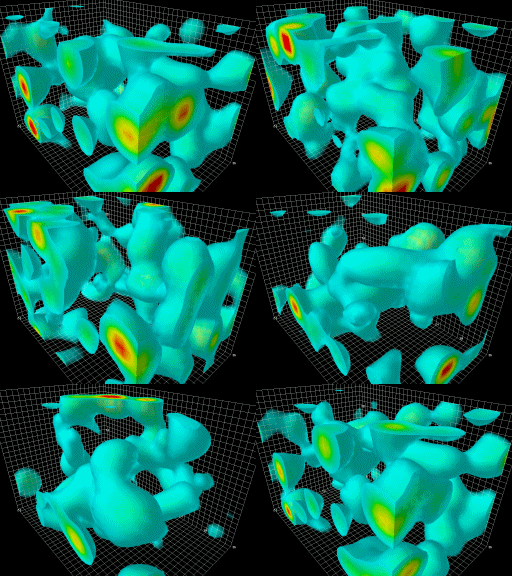
... wherein Torus-, Trefoil- and fig. 8-knots can self-emerge and interact.


-

I've been focusing on a Triangle-Mesh & Fluid-Grid combination; but now I’ve realised that such a setup is too complicated to begin with. A  Reaction-Diffusion & Fluid-Grid combination might be the best way to go. 

-

Here's a summery that outlines the idea of a dynamic foam which has 3 phases of matter:

Solid volumes : A, B, C, D, ...
Gas between those volumes that forms a circuit : ac, bc, cd, ...
Phase-transitioning from Solid < > Gas : acAD, bcAB, cdBD, …


Pressure and tension in the pathways, and between the bubbles organise the flow. Currents can block each other or merge. The temperature in the network makes some volumes heat-up and expand; while others cool-down and shrink. 


To take it to the next level the above particle model could be replaced by a Reaction Diffusion grid, boosted with a CFD-fluid and a couple of extras.

-

The idea for using a grid came from this circle-drawing article:


... and Robert Munafo’s Reaction Diffusion 'Gray-Scott Explorer':


A first extra tool would be a Voronoi-fields generator like in this example:

• A Poisson distribution of Volumes.
• Gradually expand the temperature of the Volumes.


• Where the circular volumes clash/overlap there is a pressure change -> gas creation and cell formation.
• At a tipping point all gas-canals connect and currents can start to flow around and form circuits.


Gas forms where the changing temperatures in the medium clash:


The second part is your fluid dynamics model for the current network between the volumes.


In general we get 3 zones:
Solid cell-Volumes with internal temperature like RD models.
• Fee moving Gas can form fast currents between the Volumes and carry heat, like CFD.
Phase-transition (RD): Cells can vaporise and Gas can condensate.


Sliders will be needed to fine-tune the phase-change, and the properties of the Cells and Gas.


With ultimately as goal to create steady fluctuations within the foam, where the heated circuits make some cells expand and others cool down and shrink.


Similar to Game of Life where cells live or die, forming pulsating ‘organisms'.


-

The goal is now to combine two models:

Reaction-Diffusion
Such as Gray-Scott Explorer, that uses uses only two chemicals described by the two partial differential equations (PDEs):


Fluid
Such as Jos Stams' Real-Time Fluid Dynamics based on the Navier-Stokes Equations:

The Navier-Stokes Equations for the velocity in a compact vector notation (top) and the equation for a density moving through the velocity field (bottom).

Jos Stam's fluid model uses 'classical' Brownian Motion diffusion:

Saturday, November 23, 2019

Primal-Dual Mesh

The past couple of months I have been looking for a CFD/mesh expert to help convert my simplistic Processing-model into a ...


... Primal-Dual Mesh/Graph-system.


The idea is that the 1st mesh constructs the volumetric bubble-lattice (A, B, D, ...); the 2nd mesh is a triangulated-grid that distributes the fluid-currents between the bubbles (ac, bc, cd, ...); and those two are interconnected (acAD), exchanging energy, where the solid volumes can phase-change into gas and visa-versa.


The primal-dual mesh would be like this stress-ball,


one where hot currents make the bubbles expand, and cold currents make them shrink. 


Similar to Game of Life where cells live or die, forming pulsating ‘organisms'; but with currents running through the edges between the cells.


On/off, heating and cooling the bubbles.


-----


I. The Primal-Dual-mesh

The 1st mesh is for the volumes: circles/spheres
The 2nd mesh is for the gas in between: edges

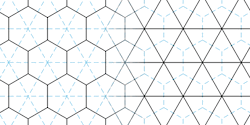
Here's a cool reference for a dual-mesh: 


Barycenter (centroid) dual-mesh:


Barycenter is important, because the dual-mesh needs to cross correctly, flow runing between the volumes, it also looks more natural and foamy:


In 3D we get a volumetric Tetrahedron-mesh.


-----

II. Three key elements for building this model

A. Spring-damping-mesh

The 1st mesh with the Delaunay-triangulations needs to be a spring-damping-mesh, to calculate and store the tension between the volumes.


Toxiclibs-library can be used that applies Verlet integration:
or Position Based Dynamics (PBD):


B. Fluid-Grid

The 2nd mesh with the Voronoi-diagrams represent the current-network between the volumes and needs to be a kind of fluid-grid to calculate the flow, such as:

• Flow fields (Eulerian):
For example Jos Stam's 'Fluid Method for Games'


• Lattice Gas Automata with scattering rules:

-
• Ore something in the trend of an Electrical-grid ...


C.  Spring-damping-mesh with Connect Fluid-Grid

The final key element is connecting the spring-damping-mesh with the fluid-grid, and make them interactive, both parts regulating each-other.


• Volumes (A)(B)(C)(D), with between them paths: (ac)(bc)(cd) 
• When flow in (ac) increases, then volume (A) contracts -> (ac) is a variable of (A)
• And visa versa the tension between (AD) regulates the current (ac) -> (AD) is a variable of (ac)

Like Ohm's Law: 
Current = Tension / Resistor


-----

III. References

The action should go in the direction of this dual-mesh sim by RedBlobGames:


Amit form RedBlobGames has also a post where he creates islands with rivers on the half-edges of a dual-mesh:


----

A dry-foam simulator by Kenny Erleben:
--

Shimmy, a fun in-browser simulation of a dynamic mesh: 


--

Finite Volume Method (FVM) by Darren Engwirda using a Primal-Dual Mesh: 

Wednesday, May 29, 2019

Dynamic LBM (Lattice Boltzmann Method)


Previously the idea was to use PBD (Position Based Dynamics), a cloth simulator, to set up a grid/network to replace the dynamic particle simulator made in Processing (link), but ... 


Anyways, I got charmed by the LBM (Lattice Boltzmann Method)  that might be more interesting seeing how it handles and takes into account multiple surrounding inputs. 


I got the help from a LBM developer who did some tests, and set up a dynamic LBM-grid.


Files:

His starting point was hexagonal grid, unfortunately his time was limited, so ...
This raised the idea of replacing the hexagonal grid by a triangular one.


Saturday, March 25, 2017

Higgs Field - IO Interactions

The wizard 'Kf' from the Processing community got the shrink-expand action going and we are starting to get a Higgs Field-ish medium. The next step is to have curling motions emerge based on current-rules so structures/knots/particles are formed. To be continued …


(slightly longer version 34 sec.)

Tuesday, January 17, 2017

Particles - Fields Simulator

For Voronoi-pattern networks we can look at two different approaches with similar results:

A. The first one is a solid medium that shrinks and loses volume and where packed matter is converted into particles that can move freely in and out the space that is emerges. Think of the cracks in a soil where water is vaporised, steam is produced, and canals are formed.


B. The second are compressed grains where force chains show up, increase the pressure and these tense grains start to crumble and form smaller particles; or think of a grinder where juices are squeezed out of fruits by compressing them.


In both cases we end up with fields and moving particles in between.

The graph below shows 'heated' fields that expand, overlapping each other and creating regions where solid matter is converted into lose particles; or look the other way around, as regions where fields cools down, retract, and generate empty space for steam to be released.


The lose particles can start line up and form currents, pathways, canals, edges between the fields. The amount of current passing the fields can make the fields shrink or expand; adding or taking away pressure. Condensation vs. Vaporisation.


Some flows will be able to line up and form closed circuits, forming steady formations. In 2D these structures are simple loops; in 3D these loops can form tubes (strings); at a next step these strings form again closed-circuits -> knots.


-

One way to get this idea working is by using boids and fields. So recently I have developed with the help of The Guru a Particles - Fields Simulator in Processing.


Here is a link to download a Mac OS X version (turn down your security settings)
and/or use the Processing files that are included: 


The cool thing about this method is that it resembles Maxwell's model for:
'A Mechanical dynamical theory of the electromagnetic field'
http://rsta.royalsocietypublishing.org/content/373/2039/20140473


The next step for this concept is to add a detector that computes a local density field of the particle flow within each field, causing them to shrink or expand accordingly. So the Fields can start to tumble over each other as currents of particle are being pushed around … getting the curling effect that Maxwell mentioned in his work.


A change in field-size due to the flowing currents, will change the 'normally' steady pathways. Steady horizontal paths == are bend into diagonal ones X redirecting flow while cutting it off at some intersections, having some fields shrink rapidly while others can quickly expand.
So the medium with particles and fields is like an elastic 'bouncy' foam.

Tuesday, January 12, 2016

Graphs


by M.S.


Going for a new approach by using Graphs & Volumes.

Wednesday, September 16, 2015

Particle Simulators in Java Script

Two particle simulators for in your browser, made with Pete Baron:

A. Deflection-Angle Presets:
(Click-drag the area to centre the spiral)

(Note, preferable to use Google Chrome) 

B. With Attraction & Repulsion Forces:

This forces are similar to those of the Lenard-Jones and Morse Potential.


Box Particle Simulator In Unity


Download here the file to run the GasSimulator in Unity:
Developed with Joshua Pearce
Note: You'll need to download Unity to run the editing interface:
Version 4.6.4 was used, All you need is the free license.

To launch the program: Open Project go to tab Project > Scenes > Scene1 (main) > (Click) Open
Press Play at the top:


You can place particles by clicking in the area, or click-drag to give them a direction, or use the R-key to spawn a group of random particles. (Spacebar is for pause and up/down keys for speed)

• Select Hierarchy: Sim
(Note, the tap 'Clear on Play' may have to be selected at Console to activate this)
Go to Inspector :
File_name to give your simulation a name.
You can record a simulation by using Shift-S to start saving the stream. Shift-L will load a saved stream in correspondence to the File_name.
File_framecount shows the number of frames being recorded.
File_framepos the rate of the loaded stream (Shft-L).
(Note, to have it run/record a simulation in the background while using other programs you'll have to go to: Edit -> project settings -> player, then check "run in background" in the inspector window.)
Time Hertz gives the Iteration rate for how precise the collision detection is.
Cfg_Spawn Count let's use the number of particles you randomly spaw by using the R-key.
Cfg_Trail Size to set the tail of the particles.

• Select tab Hierarchy: Sim > Area1
Go to Inspector for adjusting the size of the Area and Boundary reaction.
Once the simulation is running you can check here the the amount of Particles > Size

• Select tab Hierarchy: Types > Type1
Go to Inspector for creating particles:
- Rotation-axis for how they pivot when colliding.
- Cfg_Mirror All Pieces to mirror the boxes -=I=-
- Pieces-Size for the number of boxes out of which a particle is made.
- For each box it is possible to define a Group Number
With the next options it is possible to define how it interacts with other Groups:
No collision / No reaction / Partial reaction (+value)
- Color each box.
- Width * Height of the box.
- Reaction_mul_head & Reaction mul_tail sets the lerp values.
- Reaction_ratelimit sets the deflection speed.
- Reaction_deflection_d sets the angle of deflection when made contact.
- Reaction_displacement gives a jump distance away from the collision point.

-Constant_speed: All the way at the bottom to set the speed.